



Architectural Visualization studios in Greece
Architectural visualization is the process of creating visual representations of architectural designs using computer software, 3D modeling, and rendering techniques. It allows architects, designers, and clients to visualize and explore the design before construction begins.
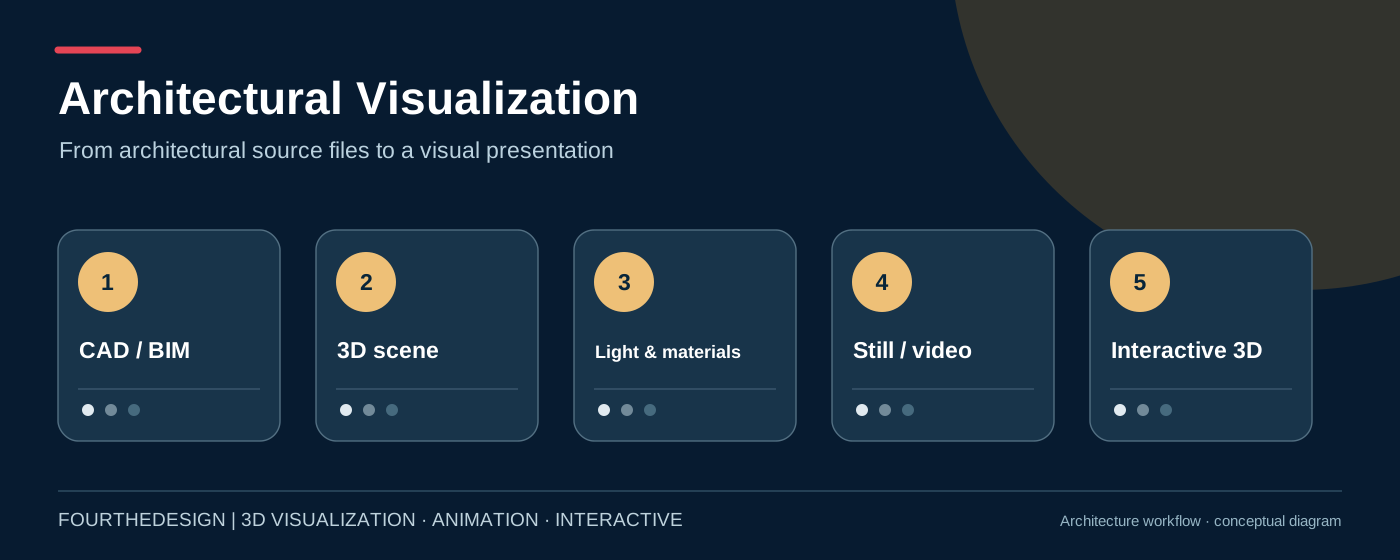
The process of architectural visualization studios in Greece typically involves the following steps:
Gathering information
This is the initial stage of the architectural visualization process. It involves gathering all the necessary information about the project, including the architectural plans, specifications, and other design details. The purpose of this stage is to ensure that the 3D model accurately represents the design and meets the client’s requirements. This stage is also an opportunity to identify any potential issues or challenges that may arise during the visualization process.
Creating a 3D model
Once all the information is gathered, the next step is to create a 3D model of the building using specialized software. This model is a digital representation of the architectural design, and it includes all the details of the building, such as the walls, windows, doors, and other features. This stage requires the use of software such as SketchUp, AutoCAD, Revit, or 3DS Max, and it requires a skilled 3D modeler to create an accurate and detailed model.
Texturing and Lighting
Once the 3D model is created, it is textured and lit to create a realistic 3d representation of a building. The team adds textures, such as brick or wood, to the 3D model to make it look more realistic. Lighting is then added to the 3D model to create a more realistic look and feel. The team will usually create different lighting scenarios to simulate different times of the day or weather conditions.
Rendering
After the texturing and lighting are complete, the 3D model is then rendered to create a final image or animation. Rendering is the process of calculating the lighting, shadows, reflections, and other details to create a photo-realistic image. The rendering process can be time-consuming and may require specialized hardware to speed up the process.
Post-production
Finally, the image or animation is refined in post-production, which involves adding special effects, adjusting colors, and editing the final output. The team may add special effects such as lens flares or depth of field to enhance the realism of the image. Color grading is also done to adjust the colors of the final output to match the desired look and feel.
The output of architectural visualization can be in the form of still images, animations, virtual reality experiences, or interactive walkthroughs. The visualization helps architects and clients to make informed decisions about the design, and it also helps to communicate the design to other stakeholders, such as builders and engineers.
Architectural visualisation in Greece: Fourthedesign’s production approach
What makes an architectural visualisation studio useful to architects and property developers? The ability to interpret design intent accurately, communicate materials and space, and deliver the right form of presentation at the right stage of a project. A still render, animated walkthrough, VR experience and interactive web platform may all start from the same architectural information, but each has different creative and technical requirements.
Fourthedesign provides architectural 3D visualisation, photorealistic rendering, animation and interactive 3D application development. The team can help studios, developers and real estate sales teams communicate both finished-looking views and explorable digital models.
Photorealistic architectural rendering
Renderings support brochures, investor decks, marketing launches and design reviews. High-quality results depend on the architectural source files, accurate proportions, coherent materials, lighting decisions, landscaping and carefully planned camera angles. An attractive render does not replace approved drawings or measurements.
Architectural animation and VR walkthroughs
An architectural animation guides the viewer through a selected route, using an edited sequence with fixed camera direction and pacing. A VR walkthrough can offer a greater sense of spatial presence in compatible headsets. Both require prepared 3D content, but live interaction must be designed and tested separately from rendering.
Interactive 3D and web-based property presentations
Web-based experiences can support building selection, floor and apartment views, linked plans and property information. The Fourthedesign interactive 3D building presentation guide explains these workflows in detail. The ENIGMA platform under development by Fourthedesign explores building-scale navigation, isometric floor views, lighting controls and real estate information; feature availability varies with each deployment.
How to brief an architectural visualisation studio
- Reference material: drawings, CAD/BIM, landscape plans, material schedules and approvals.
- Presentation goal: still images, animation, VR, web 3D or a combination.
- Output: views, aspect ratios, resolution, languages and intended devices.
- Review workflow: clay camera previews, material direction, revisions and final files.
- Commercial use: media rights, hosting, maintenance and whether editable source files are included.
Related reading: photorealistic renderings in Greece and VR architectural walkthroughs.
Frequently asked questions
Can an existing Revit or SketchUp model be reused? Often, though material setup, geometry quality and optimisation vary. Is browser-based 3D equivalent to headset VR? No: a browser interface prioritises easy access, while headset VR prioritises spatial immersion. Can real estate availability be integrated? Yes, with an agreed data source and update workflow.
Architectural Visualization — Fourthedesign
3D animation, architectural visualisation and interactive applications.

